

Local or Cloud-Based Smart Home Controls: What Should Your Filipino Home Use?

For many Philippine homes, the most practical answer is a local-first system that handles core automations and physical controls directly inside the house, paired with cloud services strictly for remote check-ins when away. Relying purely on cloud-based smart devices leaves daily essentials—such as lighting, perimeter schedules, and motor gates—vulnerable to frequent internet outages, telco line drops during typhoons, and sudden server downtime. Conversely, building a purely offline smart home can be technically cumbersome to maintain and removes the convenience of receiving security alerts or checking cameras while stuck in traffic.
Evaluating local vs cloud smart home Philippines setups requires looking past feature lists on product packaging. The real test happens when utility lines drop during monsoon weather, when an elderly relative or kasambahay needs to turn on a hallway light without a smartphone, or when a manufacturer changes its software ecosystem. Understanding how each approach behaves under real Philippine living conditions helps ensure your investment remains functional, dependable, and safe over many years.
Local or Cloud: The Practical Difference Inside a Philippine Household
A cloud-dependent smart system routes every command over the public internet to an off-site commercial server. When someone presses a button on a mobile phone or speaks to a voice assistant in the sala, that request leaves the house, travels across external network infrastructure, gets processed in a remote data center, and sends a return command back to the house router to activate the physical relay. When broadband is running smoothly, this process can feel seamless. However, when your internet service provider encounters an undersea cable cut, scheduled line maintenance, or local fiber damage after heavy rain, the communication chain breaks. In a purely cloud-dependent setup, automations may fail to trigger, and mobile apps often report devices as offline, even if the user is standing right next to the physical switch.
A local-control architecture, by comparison, communicates directly across your internal private network using protocols like Zigbee, Z-Wave, Thread, or local-area-network Wi-Fi. In this setup, a central controller or automation hub inside the house processes commands locally. If the fiber connection drops, devices capable of direct local communication can continue to interact across the internal network. Depending on how each automation is configured and supported by the controller, exterior lights can still switch on at dusk, motion sensors can still illuminate hallways, and scene keypads can still coordinate lighting scenes without needing clearance from an external server.
However, local capability is not an automatic all-or-nothing guarantee. A device carrying a specific protocol badge does not inherently mean every advanced feature or schedule operates offline. Certain integrations, third-party plug-ins, or voice-processing engines still query cloud APIs unless specifically set up for offline processing. Local wireless networks can also experience radio interference, network congestion, or hardware processing delays. Rather than assuming any system operates completely offline based on marketing labels alone, homeowners should physically disconnect their router's internet feed during testing to verify which specific automations, schedules, and button actions remain active.

A dedicated local controller manages automation schedules on-site without relying on external cloud servers.
Internet Reliability and Brownout Recovery
Internet service stability in the Philippines varies significantly across subdivisions, municipalities, and provinces. Road construction, utility pole relocations, and typhoon winds frequently damage overhead cables, resulting in service interruptions that can take hours or days to repair. If your routine lighting schedules, pressure pump triggers, or gate controls depend on continuous external cloud verification, an internet interruption creates immediate operational headaches.
Brownouts introduce another critical layer of disruption. When utility power drops and your generator or solar battery backup kicks in, automated hardware experiences sudden voltage changes and restarts. As explored when evaluating home battery backup essential circuits vs whole house Philippine setups, managing electrical loads during an outage requires smooth transitions. It is a misconception that local control provides electrical power continuity by itself; local controllers, network switches, and peripheral radios still require dedicated backup power to stay active.
Even with an uninterruptible power supply or inverter in place, controllers and network equipment often require time to reboot, re-initialize radio meshes, and reconnect endpoints after a complete power drop. Unlike cloud devices that must re-establish external internet handshakes and server authentication before processing schedules, a properly backed-up local controller does not wait for a broadband reconnection. Nonetheless, homeowners should deliberately simulate power loss and power restoration to measure how long their chosen hubs and switches take to stabilize before relying on them for routine functions.
Device behavior upon power restoration is equally important. Whether a device is cloud-based or locally controlled, its default power-on state varies widely by model and firmware design. Some smart switches and smart breakers default to an "on" state after an electrical outage, which means a momentary midnight power flicker could suddenly illuminate every bedroom in the house. Other models can be configured to default to "off," remain in their last known state, or follow a custom script. For heavy loads like deep-well pumps, water heaters, and motorized driveway gates, returning to a previous active state may actually create safety or electrical surge hazards. Homeowners must check the configurable power-restore settings for each individual device and verify that motors and mechanical equipment do not restart in an uncontrolled manner.
Manual Overrides and Multi-Generational Household Access
A smart home becomes impractical if someone must unlock a mobile application or memorize voice commands just to fetch a glass of water at night. Filipino households typically include extended family members across multiple generations—grandparents, children, cousins, and domestic staff. Designing an automation scheme that relies primarily on digital literacy or personal smartphone access introduces unnecessary daily friction and confusion.
Every smart switch and motorized fixture must retain intuitive, physical manual operation at the wall. The wall switch should function predictably for any guest or relative: pressing it turns the circuit on or off, regardless of whether the automation hub is updating, the Wi-Fi router is cycling, or the internet is offline. Relying on smart bulbs paired with traditional wall switches often frustrates households, because the moment someone instinctively switches off the wall plate, the smart bulb loses electrical current and drops off the control system altogether.
Deciding how extensively to deploy automation requires balance across different areas of the house. As discussed in our guide on choosing smart switches throughout the house or only in selected rooms, focusing automated controls on shared zones, exterior perimeter lighting, and common family spaces often delivers the greatest practical utility. In private bedrooms, guest suites, or service areas, standard mechanical rocker switches frequently offer a simpler, more durable solution that every household member can operate without hesitation.

Physical wall switches ensure reliable daily operation for grandparents, children, and household staff.
Recurring Subscriptions, App Lock-In, and Future Replacement
Cloud-centric smart ecosystems often depend on commercial business models that may shift over time. Depending on the brand, features such as recorded video history, multi-user permissions, advanced activity zones, or rich push notifications may require recurring subscription fees. These charges might be billed per device, per registered account, or tied to a tiered service package. For a home using dozens of cloud endpoints, ongoing subscription costs can accumulate over several years.
Platform longevity and obsolescence present an even bigger consideration. When a consumer electronics manufacturer closes its cloud operations, changes its firmware policies, or discontinues an older hardware generation, proprietary cloud devices may lose core features or cease working entirely. Some products purchased just a few seasons ago may become difficult to integrate after mobile operating systems update or companion applications are removed from app stores. Before purchasing cloud-managed hardware, it is prudent to review whether essential features will continue to operate if a subscription is canceled or if the provider modifies its service terms.
Using local hardware that supports standard communication protocols can help reduce reliance on any single consumer brand, but it does not eliminate replacement planning altogether. While open standards make it easier to link devices to an independent controller, replacing a broken switch with a different model still requires careful verification. You must confirm that your existing controller supports the replacement device's specific integration profiles, that wireless frequencies match local Philippine regulatory standards (particularly for protocols with regional radio bands like Z-Wave), and that you are prepared to re-pair the device and rebuild any associated automations or room groups.
Homeowners choosing between local and cloud-based controls may want to discuss their requirements through Zillvek Builders' Customised Design service, since customised home design should respond to household routines, protection, budget, and long-term use.
Combining Local Architecture with Cloud Convenience
Choosing local control does not require severing all ties with modern cloud convenience. For most families, a practical approach is a hybrid structure: hosting primary logic and device communication within the residence, while utilizing an encrypted remote-access bridge when family members need to manage the property from outside.
In this hybrid model, routine household events—such as dusk-to-dawn exterior lighting, garden watering timers, and physical wall switch actions—execute through your local controller and in-house wiring. For structured cabling ideas to support this infrastructure, consider our review on whether Wi-Fi alone or wired network points best match your construction plan. When someone is away from home, a secure remote-access service or encrypted tunnel can bridge the mobile app to the local controller. This allows you to check gate statuses, view verified camera feeds, or adjust air conditioning before arriving home.
It is vital to recognize the operational boundaries of this setup. A remote bridge does not guarantee flawless remote connectivity. Off-site monitoring and out-of-home commands depend on a working internet connection, a properly functioning remote-access service, and continuous power delivered to every critical link in the chain—including your optical network terminal (ONT) or modem, primary router, network switches, central controller, and the specific endpoint devices you want to manage. That operating electricity can come from the utility grid, a generator, a home battery system, or dedicated uninterruptible power supplies (UPS), but any backup system must be specifically wired and dimensioned to power the full collection of network and control hardware required for that function. If a brownout drops power to your fiber ONT even while your controller runs on battery, remote visibility is lost until connection to the external network is restored. Furthermore, convenience automations should never be conflated with life-safety systems. While local automations can comfortably manage lighting scenes and comfort schedules, dedicated functions such as fire detection, gas-leak alarms, and certified security alarms should always rely on independent, purpose-built hardware rather than consumer-grade smart home controllers.
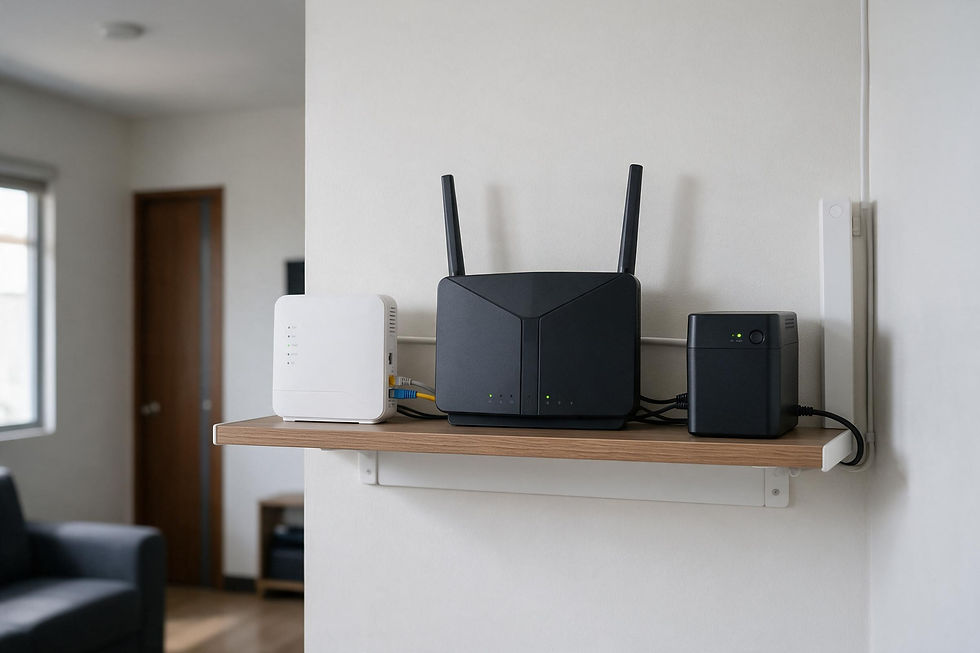
Remote monitoring requires steady power to the modem, router, hub, and endpoint devices simultaneously.


Comments